From the blog
Dental Practice Website With Online Scheduling: The Front-Desk Checklist (and the Agency That Ships It)

When was the last time you pulled up your own dental practice website on your phone - not at your desk, not on the office iMac, but standing in line at New Seasons with a thumb and a 5G signal? If the answer is "a while," you are not alone. This is the post about what a dental practice website with online scheduling actually needs in 2026 so your front desk stops fielding calls the site should have handled: the new-patient form that doesn't autofill into Dentrix, the "Meet the Dentist" page still showing an associate who left in 2022, the scheduling widget that asks for insurance twice, and the blog that promised "two posts a month" and produced two posts in two years.
It is also the post about the harder question underneath all of that: who actually builds and runs this site for you? Because by the time most practice owners search for a dental website designer, they have been burned by a generalist agency that didn't understand Dentrix, a freelancer who shipped a beautiful site and disappeared, or a national "dental marketing agency" charging $1,500 a month for a templated WordPress build.
Start where your patients start: the phone in their hand
Industry averages: in our experience, 70–80% of new-patient traffic to a general dentistry site is on mobile, and the most common action is tapping "Request Appointment." If that button opens a PDF, a Google Form, or a third-party scheduler that doesn't know your operatory hours, you are losing the lead before the first prophy is scheduled. The fix is unglamorous but specific:
- A sticky mobile call/book bar that follows the patient down the page.
- A new-patient intake form that writes directly into your PMS - Dentrix, Eaglesoft, Open Dental, or Curve.
- Real operatory availability, not a "someone will call you within 24 hours" message that loses you to the practice across Burnside that confirms instantly.
- Sub-2-second mobile load times, because Google's Core Web Vitals scoring is now a Local Pack ranking factor for "dentist near me" queries.
If you want help auditing this on your specific site, we can walk through the audit on a 20-minute screen share. We will pull your site up on a real phone, hit the booking flow the way a parent with a screaming toddler does, and tell you exactly where it breaks.
The new-patient intake handoff (Dentrix, Eaglesoft, Open Dental)
Here is the friction point every front desk hates: a patient fills out the new-patient form, the form emails a PDF, and the front desk re-types the patient's name, DOB, insurance carrier, group number, and medical history into Dentrix. This is a 12-minute task per new patient, performed under interruption - and it is where typos in insurance group numbers come from, the same typos that show up later as denied claims.
A modern dental site should hand off intake as structured data, not as a flat PDF:
- Field-level mapping to your PMS so first name, DOB, and insurance fields land in the right columns of the Dentrix or Eaglesoft patient record.
- HIPAA-aware form storage so medical history doesn't sit in an unencrypted inbox indefinitely.
- A confirmation flow that triggers recall reminders and pre-appointment imaging requests automatically.
- A consent layer for marketing communication that respects the patient's choice on day one, so your hygienist isn't apologizing for unwanted texts at the six-month recall.
Workspace CMS handles the front-end form, the structured payload, the HIPAA-aware storage, and the audit log. The PMS-side integration into Dentrix or Eaglesoft itself sits with your practice management vendor or middleware like Modento or Weave - but the website side, the part you've been struggling with, is solved on our end and coordinated during onboarding. You can browse the full features inventory if you want to see exactly what's in the box before you book a call.
UNLIMITED MANAGED CHANGES
Send a ticket. We ship the change.
Every Workspace CMS plan includes unlimited managed CMS edits. Essentials ships in 4 business days. Growth ships in 2. Premium ships in 12–24 hours. No per-edit fees. No "open a Jira" overhead. Every Friday-hours change, every new associate bio, every Invisalign promo banner, every emergency-dentist landing page - just describe what you need and our team builds it on your live site.
Schema markup and AEO: how your 4.9-star reviews show up on Google (and ChatGPT)
When you search "dentist near me," some practices show a star rating right in the Google results, and others just show a blue link. That is structured data- specifically Dentist, LocalBusiness, and AggregateRating JSON-LD. It is invisible on the page, but Google reads it and decides whether to enrich your listing.
The same applies to AEO (Answer Engine Optimization). ChatGPT, Claude, Perplexity, and Gemini all read JSON-LD when they decide which Portland dentist to recommend in response to a voice or chat query like "who is the best family dentist near Hawthorne for kids?" If your Dentist schema doesn't include your specialties, your accepted insurances, your accepted languages, and your aggregate rating, you simply don't show up in that answer.
Workspace CMS includes a visual Structured Data (JSON-LD) Editor on every page with live validation before publish - you don't write the JSON, you fill in fields and the editor compiles and validates it. You can see how that piece works on the Rich Search Results editor deep-dive. The platform also runs an AI Visibility Tracker that pings ChatGPT, Claude, Perplexity, and Gemini weekly with prompts like "best pediatric dentist in [your neighborhood]" and sends you a digest showing which engines mention you, which mention a competitor, and how that's trending over time.
What a dental website designer actually has to deliver in 2026
If you are searching for a dental website designer in 2026 (or a dental marketing agency, a dentist web design agency, a dental practice website company- pick your phrasing), the brief is no longer "make us a nice-looking site." Pretty sites are commodity. The brief is:
- Build the site on a stack that scores Lighthouse-grade Core Web Vitals on the first load (Next.js + Vercel, not a five-plugin WordPress build).
- Ship JSON-LD for
Dentist, every provider as aPerson, every service as aMedicalProcedure, and reviews asAggregateRating- and validate it before publish. - Run the patient-education blog cadence with you, not at you.
- Track AEO visibility across the four major LLMs.
- Manage the unglamorous monthly grind - Friday hours, new associate bios, holiday closures, FSA-deadline banners, Invisalign promos - without per-edit invoices.
- Coordinate with your Dentrix or Eaglesoft vendor during onboarding so intake actually flows.
That is the bar. Most generalist agencies will hit one or two of those and ghost on the rest. The reason Workspace CMS exists as a category is that we built the platform around being the dental website designer that hits all six - and then exposes the controls so you can see what we're doing. Other sites in this space are worth looking at side by side - the live demo gallery shows 20+ examples, several of them dental, with their actual SEO panels and structured data visible.
"Meet the Dentist" is the second-most-visited page. Treat it that way.
In every dental analytics readout we've pulled, page traffic order is: (1) Homepage, (2) Meet the Dentist, (3) Services (Invisalign, pediatric, etc.), (4) Contact. Meet the Dentist is where new patients decide whether they trust you with their kid's first sealant. It is also the page that goes stalest fastest - associates leave, a hygienist joins, you finish a CE in implant placement, and none of it lands on the page for nine months.
What it needs:
- A real photo, taken in the last two years.
- A short paragraph about your treatment philosophy - "conservative, evidence-based, no upselling treatment planning a patient doesn't need."
- CE credentials and specialty work (Invisalign Diamond, implants, pediatric comfort techniques).
- Schema-tagged as a
Personentity so Google connects you to your reviews and your NPI.
On Workspace CMS Growth, swapping a headshot, updating a bio, or adding an associate's page is a ticket - send a ticket; we ship the change, typically same- or next-business-day. The full managed-change workflow is documented on the marketing site, including the average turn times by tier and what a ticket looks like end-to-end. Tell us about your practice and we'll walk you through the ticket flow live.
Why online scheduling still needs a managed patient-education cadence
Here is the part most dental sites get wrong: online scheduling alone won't rank you for "family dentist Portland." What ranks is online scheduling plus a consistent stream of patient-education content - "What to expect at your child's first dental visit," "Invisalign vs. traditional braces for adults," "Why we use digital impressions instead of goop," "How FSA dollars work for end-of-year crowns."
You already know this. You also know you don't have time to write it, and the last marketing person who promised you a blog ghosted after two posts. This is where the Workspace CMS toolset earns its keep. Three pieces work together:
- The AI Blog Generator drafts patient-education posts in your practice's brand voice - locked to your tone, not generic GPT mush - using prompts seeded from your actual services.
- The Content Pipeline Board is an editorial kanban that moves a post from idea → draft → human edit → schedule → publish, with you (or your office manager) signing off at the human-edit step.
- The AI Meta Rewriter auto-generates the title and meta description for each post so you don't have to think about it.
On Growth, our editorial team runs that pipeline for you. You see the kanban; you approve the human-edited drafts; we schedule and publish. One post on "sealants for school-age kids" in August, one on "end-of-year FSA dental benefits" in November - that cadence, sustained, is what moves a Portland practice from page 2 to page 1 for "family dentist [neighborhood]" inside 9–12 months.
Pricing tiers, dental edition
- Essentials - $89/month: Self-managed. You write the posts (or use the AI Blog Generator with 200 AI credits). 4-business-day SLA on managed changes, all SEO controls included. Fine if you have an in-house person who will actually do it.
- Growth - $199/month: Managed by 1Digital. 2-business-day SLA on edits, image swaps, location pages, and blog posts. 1,000 AI credits and 15-prompt AI Visibility tracking. This is the tier most single-location practices land on, because the 2-business-day SLA means a cadence of 1–2 patient-education posts per month actually happens.
- Premium - $449/month: 12–24 hour change SLA, daily AI Site Audit, 30-prompt AI Visibility tracking, and the Multi-Location Storefront with ZIP-search store locator for multi-op practices. Worth it for multi-location DSO-adjacent groups running 3+ offices.
See the full pricing breakdown for the line-by-line comparison. Growth is the sweet spot for a single-location family practice; Premium is the move for a small DSO that needs per-location hours and per-location service pages without re-templating from scratch.
The six platform features dental practices actually use every month
You don't need every CMS toggle. You need the six that affect dental marketing day to day:
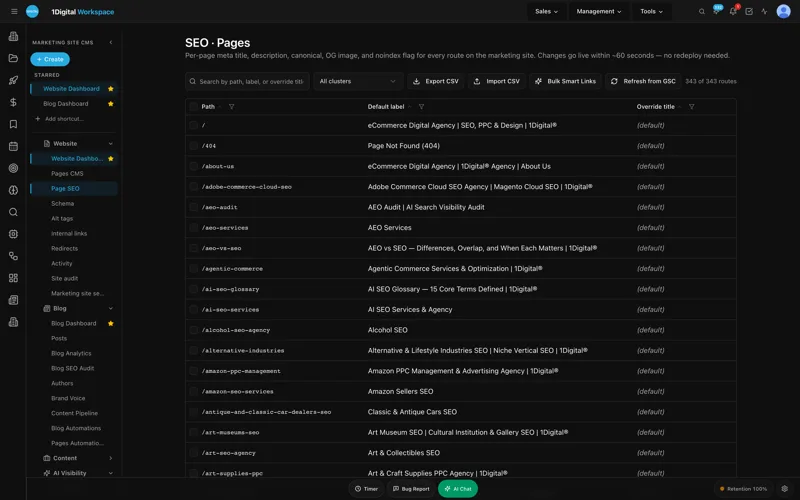
- Page Editor + SEO Sidebar- rich-text editor with a permanent SEO panel docked to the side, so meta title, description, canonical, and OG card for "Invisalign Portland" or "emergency dentist Hawthorne" are visible while you write.
- Structured Data (JSON-LD) Editor- visual editor with live validation, used to ship
Dentist,Person,MedicalProcedure, andAggregateRatingschema without hand-writing JSON. - AI Blog Generator + Content Pipeline Board- the patient-education engine.
- AI Meta Rewriter- auto-generated titles and meta descriptions for every page and post.
- Site Audit- 40+ checks per page (missing alt tags, broken links, oversized images, missing schema, weak meta) with one-click remediation.
- Analytics (GA4 + GSC unified)- traffic and ranking data on a single screen, so you can see that "pediatric dentist [neighborhood]" went from rank 14 to rank 6 without bouncing between two tools.
For multi-location groups, add a seventh: the Multi-Location Storefront with map, ZIP search, and per-location hours and providers - the standard solution for a practice running an east-side and a west-side office on the same brand.
Dental Practice Website With Online Scheduling: The FAQ
Will Workspace CMS integrate with my Dentrix or Eaglesoft workflow?
The website-side intake form, structured payload, HIPAA-aware storage, and confirmation flow are handled by Workspace CMS. The PMS-side integration into Dentrix or Eaglesoft sits with your practice management vendor or middleware like Modento or Weave. We coordinate during onboarding so the handoff is clean.
How long does it take to launch a new dental practice website?
Most clients launch in 2 weeks. For a single-location family practice with existing content, 10–14 business days is typical. If you need new headshots and copy, plan for 3–4 weeks total.
Can I keep my existing domain and Google reviews?
Yes. We migrate your domain, set up redirects through the Redirect Manager so no link equity is lost, and re-attach your Google Business Profile. On Growth, your Google reviews sync to the site and you can reply from the dashboard.
Do I have to learn HTML or fight a page builder to update my hours?
No. You send a ticket - "update Friday hours to 8–2 starting October" - and we ship the change, typically same-business-day on Growth. If you'd rather edit it yourself, the rich-text Page Editor is there with the SEO Sidebar docked next to it.
What about HIPAA and patient privacy?
Intake forms are stored encrypted with role-based access. Owner / Editor / Viewer roles plus a full audit log mean you can see who accessed what and when - which is what your compliance officer will want documented.
If you've read this far, you are the person at the practice who already knows the website is the bottleneck. The next step is the cheapest one: send us your current URL and we'll send back a free SEO and AEO audit showing exactly what would move on your site - schema gaps, missing alt tags, intake form friction, and where you currently rank vs. where you could rank with a managed blog cadence. No sales pitch, no obligation. Just the checklist your front desk has been waiting for.


